Close Menu
  • Gaming
    • Platforms
      • Nintendo
      • PC
      • PlayStation
      • Xbox
  • Entertainment
    • Movies
    • TV
    • Royals
  • Celebrity
    • Hollywood
  • Human Interest
  • Astrology
  • More
    • Reviews
Facebook X (Twitter) Instagram LinkedIn YouTube
  • About Us
  • Join Our Team
  • Meet the Team
  • Privacy Policy
  • DMCA Policy
  • Contact Us
  • Terms of Use
  • Sitemap
  • Editorial Guidelines
  • Advertising Policy
The Nerd Stash
  • Gaming
  • Celebrity
  • Hollywood
  • Human Interest
The Nerd Stash
Home»Gaming»Can Blood of Dawnwalker Run on Steam Deck? Best Settings & Performance Guide

Can Blood of Dawnwalker Run on Steam Deck? Best Settings & Performance Guide

Even the Vrakhiri can’t cure this frame rate problem

Sidharta F. RasidiBy Sidharta F. RasidiSeptember 4, 20262 Mins Read
Can Blood of Dawnwalker Run on Steam Deck? Best Settings & Performance Guide
Image source: The Nerd Stash

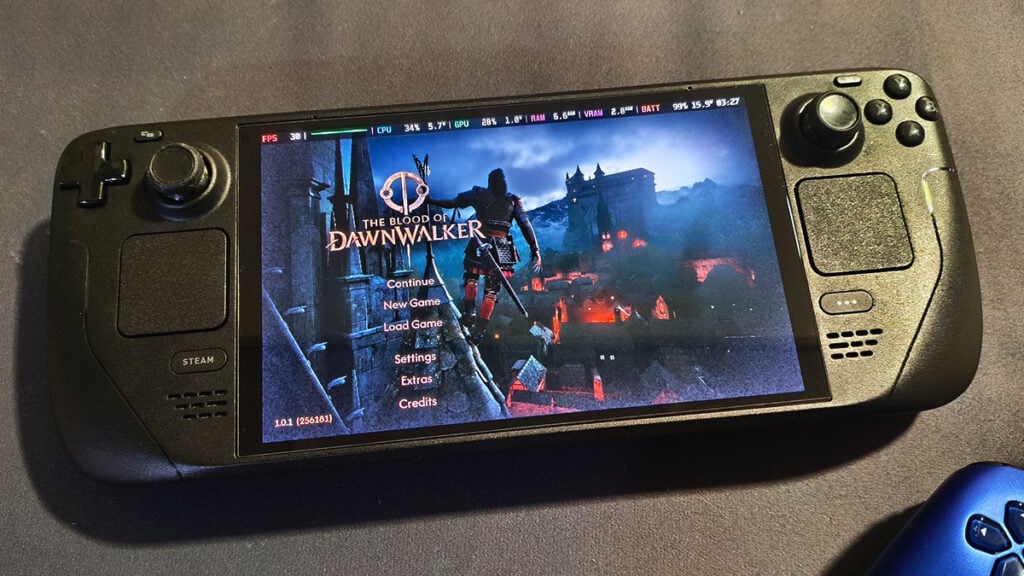
The Blood of Dawnwalker seems like one of those perfect games to play on a Steam Deck. Chipping away at its quest-filled open medieval world from the comfort of your bed is undoubtedly the best way to finish massive RPGs like this. Unfortunately, Valve’s handheld isn’t quite ready to join Coen without some serious compromises.

To be fair, yes, The Blood of Dawnwalker can technically run on the Steam Deck. However, our testing shows that performance quickly falls below 30 FPS even in the starting area. If you’re determined to play it on a handheld PC anyway, these are the best Steam Deck settings we’ve found so far.

Best Steam Deck Settings for Blood of Dawnwalker
Best Steam Deck Settings for Blood of Dawnwalker
Image source: Rebel Wolves via The Nerd Stash

Do keep in mind that The Blood of Dawnwalker is currently marked as Unsupported on the Steam Deck. It doesn’t have the Steam Deck Verified badge stamped on its Store page. With that in mind, don’t expect smooth performance when playing it on the go.

Display Settings

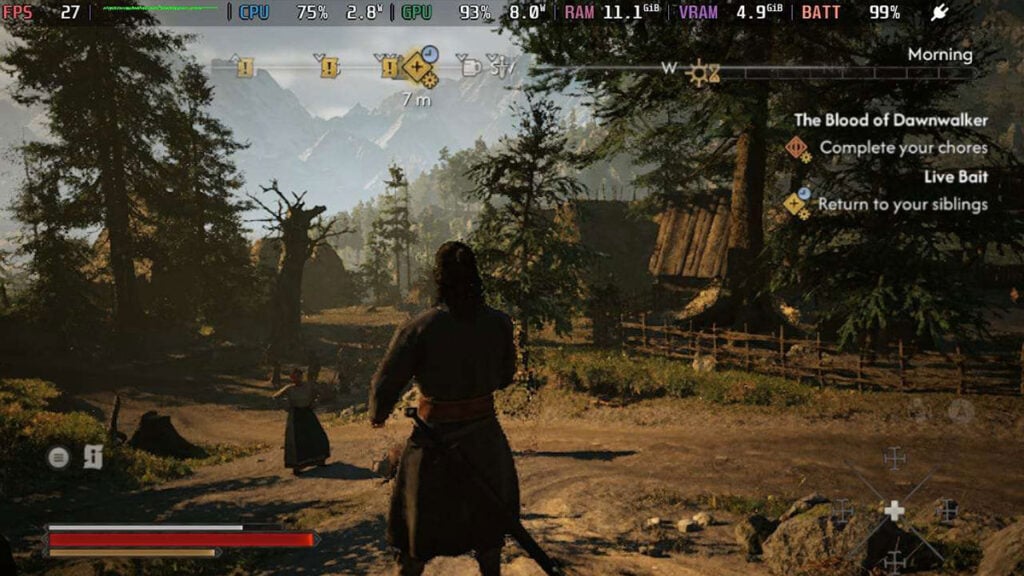
Even in the less demanding tutorial scene, The Blood of Dawnwalker cannot maintain a steady 60 FPS using the default Low Preset. It frequently drops into the 40s and below — and things get much worse once the first chapter begins. As Coen steps outside his home, performance craters to around 20–25 FPS.

We tried lowering the resolution to 1024×640 through Steam’s Maximum Game Resolution settings, but it still doesn’t improve those numbers. Because of that, we suggest sticking with the Steam Deck’s native 1280×800 resolution and limiting the frame rate to 30 FPS.

Display ModeBorderless
Resolution1200 x 800
Frame Rate LimitOn
Maximum FPS30

Video Settings

Basically, you’ll want to run The Blood of Dawnwalker at the lowest possible settings on Steam Deck. Unfortunately, turning on upscaling doesn’t provide a noticeable performance boost or alleviate its frame rate woes.
The Blood of Dawnwalker: How to Clear Scouting Towers and Reveal Map Locations
Related: The Blood of Dawnwalker: How to Clear Scouting Towers and Reveal Map Locations
Shadow QualityLow
Light QualityLow
Reflections QualityLow
Post-Processing QualityLow
Texture QualityLow
Effects QualityLow
Shading QualityLow
Foliage QualityLow
Detail QualityLow
Volumetric QualityLow
Upscaling TechnologyFSR
Upscaling ModeUltra Performance
Frame GenerationOff
Motion BlurOn (Doesn’t affect performance)
BloomOff (Doesn’t affect performance)
Chromatic AberrationOff (Doesn’t affect performance)
Depth of FieldOn (Doesn’t affect performance)

So, can you play The Blood of Dawnwalker on Steam Deck? Again, you sort of can, but we wouldn’t recommend it for Rebel Wolves‘ open-world RPG experience. Unless future patches significantly improve Steam Deck performance, Coen’s bloodsucking adventures are better enjoyed on more powerful hardware.


Related Topics
Steam Deck The Blood of Dawnwalker
Share. Facebook Twitter LinkedIn Reddit Email
Sidharta F. Rasidi
  • Website

Since middle school, Sidharta has used his video game blog as a handy excuse to avoid studying. After graduating with a degree in Management Information Systems from Bina Nusantara University, he spent years honing his skills as a games journalist, working as an editor for a local gaming site and freelancing elsewhere. Nowadays, when he’s not busy crafting outrageous plots for his serialized comic, Sidharta covers niche games on his personal blog, StoPlayinGame.com. His favorite game series includes Monster Hunter, Earth Defense Force, THE iDOLM@STER, Road Trip Adventure, and KOEI Tecmo's Warriors.

SUGGESTED READS

The Blood of Dawnwalker Scouting Towers
Gaming

The Blood of Dawnwalker: How to Clear Scouting Towers and Reveal Map Locations

How to Fast Travel and Activate Shrines in Blood of Dawnwalker
Gaming

How to Fast Travel and Activate Shrines in Blood of Dawnwalker

State of Play September 2026 Announcements
Gaming

PlayStation State of Play (September 2026): All Major Announcements

News

‘You are completely spineless’: North Carolina Republicans Angry with Sen. Thom Tillis for Demanding Hegseth Be Fired, Despite Voting for Him

CS2 float values
Gaming

How to Read Float Before Buying a Skin

Dungeons & Dragons Long Rest Tavern preview
Gaming

Dungeons & Dragons: Long Rest Tavern Preview – The Other Part of Adventuring

The Nerd Stash
Facebook X (Twitter) Instagram YouTube LinkedIn
  • About Us
  • Join Our Team
  • Meet the Team
  • Privacy Policy
  • DMCA Policy
  • Contact Us
  • Terms of Use
  • Sitemap
  • Editorial Guidelines
  • Advertising Policy
© 2026 The Nerd Stash. All Rights Reserved.

Type above and press Enter to search. Press Esc to cancel.