

Close Menu
  • Gaming
    • Game Guides
    • Codes
    • Game News
    • Game Previews
    • Game Reviews
    • Game Features
    • Game Lists
    • Platforms
      • Nintendo
      • PC
      • PlayStation
      • Xbox
      • Mobile
  • Entertainment
    • Movies
    • Movie Features
    • Movie Reviews
    • TV
    • Reality TV
    • Royals
  • Celebrity
    • Hollywood
  • Human Interest
  • Astrology
  • Videos
  • More
    • Anime
    • Lists
    • Podcasts
    • Reviews
Facebook X (Twitter) Instagram LinkedIn YouTube
  • About Us
  • Join Our Team
  • Meet the Team
  • Privacy Policy
  • DMCA Policy
  • Contact Us
  • Terms of Use
  • Sitemap
  • Editorial Guidelines
  • Advertising Policy
The Nerd Stash
  • Gaming
  • Celebrity
    • Hollywood
  • Human Interest
  • Videos
The Nerd Stash
Home»Game Guides»How To Fix the Failed to Host Multiplayer Session Error in Palworld

How To Fix the Failed to Host Multiplayer Session Error in Palworld

Open ports, close errors, game on!

Asanga WijeratneBy Asanga WijeratneJanuary 20, 20242 Mins Read
How to Fix Palworld Failed to Host Multiplayer Session Error
Image Source: Pocket Pair
This article is over 1 years old and may contain outdated information.

Over half a million players are already enslaving Pals in Palworld, but this has caused strain on the game’s servers, resulting in a common issue for many: the “failed to host multiplayer session” error. This problem, primarily caused by server overload due to the game’s unexpected popularity, mainly affects those attempting to host co-op sessions with friends. However, you can try a few fixes to avoid failing to host multiplayer session errors in Palworld.

Fixes for “Failed to Host Multiplayer Session” Error in Palworld
Palworld Failed to Host Multiplayer Session Error
Image Source: Pocketpair via The Nerd Stash

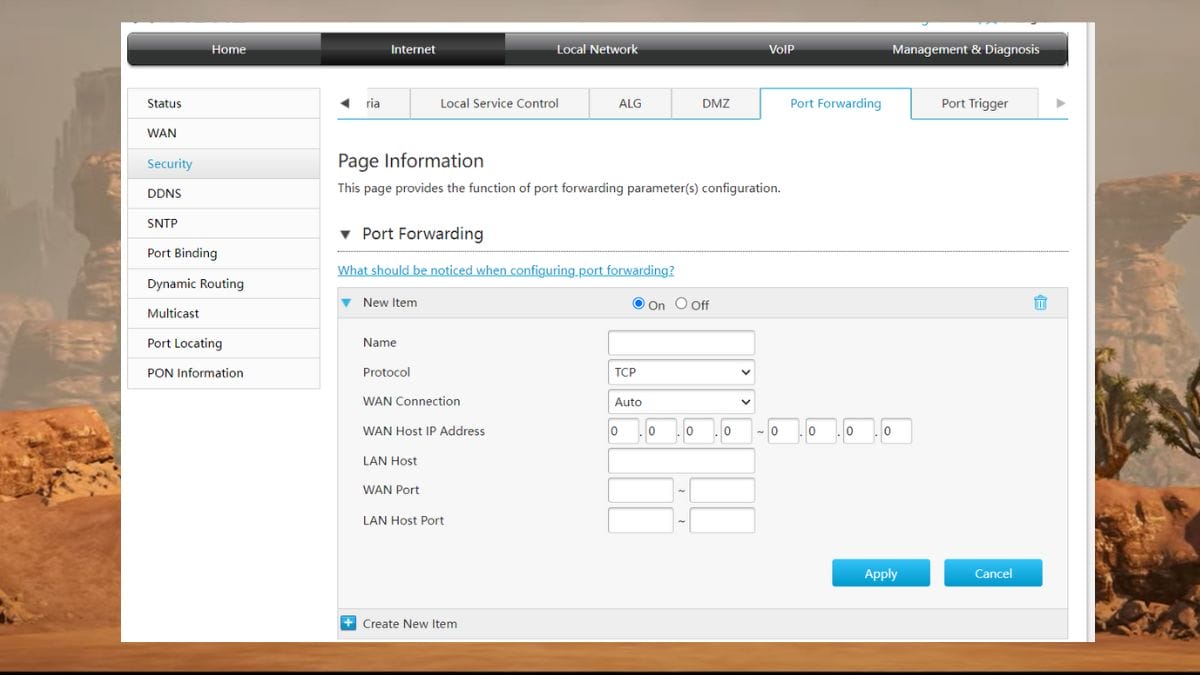
You can fix this error by allowing the UDP ports 8221 & 8211 to be on your network. This is the only solution given by players to overcome this problem. Below are the steps you need to follow.

1. Access your router settings: This is typically done by entering your router’s IP address into a web browser. You can usually find this IP address on the back of your router or in its manual.

2. Locate the Port Forwarding Section and enter port details: Once logged in, find the Port Forward and add two separate entries: one for UDP port 8221 and another for UDP port 8211.

3. Specify the device you play and save: Specify the device you play (PC or console) and then save and restart the router. Then, launch the Palward and check that the failed to host multiplayer session error is gone.

Related:

Palworld Starter Guide

If the error still appears, check your firewall settings and ensure it allows traffic through the newly added ports. However, remember the above method does not always work. Pocketpair has stated on the official Palworld X page that they are actively working on resolving the error. So, hopefully, we will get a permanent fix soon.

Hello everyone,

We are blown away with the response to Palworld and we're doing our best to respond to your issues!

Currently, our server provider is reporting that due to the large amount of concurrent players, the servers have become unstable and you may be experiencing…

— Palworld (@Palworld_EN) January 19, 2024

Some players have also mentioned that restarting the game and playing during off-peak hours will help fix the failed-to-host multiplayer session errors in Palworld. You can also try those methods if the above solution fails.


Related Topics
Guide Palworld
Share. Facebook Twitter LinkedIn Reddit Email
Asanga Wijeratne
  • Website

SUGGESTED READS

Marathon Raid Map
Features

Marathon Will Break Extraction Shooter Conventions by Bringing Destiny-like Raids Into the Mix

Hytale Reddit Moderator Clarifies 2.8 Million Player Count: 'How the Table Turns…'
Game News

Hytale Reddit Moderator Clarifies the Mindboggling 2.8 Million Player Count Situation: ‘How the Table Turns…’

Hytale Reaches 2.8 Million Active Players on Release Day, Says Developer: 'Eat Your Heart Out'
Game News

Hytale Reaches 2.8 Million Active Players on Release Day, Says Developer: ‘Eat Your Heart Out’

All Hytale Creative Mode and Server Console Commands
Game Guides

All Hytale Creative Mode and Server Console Commands

Hytale Email Not Sending error
Game Guides

How To Fix the ‘Email Not Sending’ Error in Hytale

Hytale How To Install Mods
Game Guides

How To Install Mods in Hytale

Trending
Marathon Raid Map

Marathon Will Break Extraction Shooter Conventions by Bringing Destiny-like Raids Into the Mix

Hytale Reddit Moderator Clarifies 2.8 Million Player Count: 'How the Table Turns…'

Hytale Reddit Moderator Clarifies the Mindboggling 2.8 Million Player Count Situation: ‘How the Table Turns…’

Hytale Reaches 2.8 Million Active Players on Release Day, Says Developer: 'Eat Your Heart Out'

Hytale Reaches 2.8 Million Active Players on Release Day, Says Developer: ‘Eat Your Heart Out’

All Hytale Creative Mode and Server Console Commands

All Hytale Creative Mode and Server Console Commands

The Nerd Stash
Facebook X (Twitter) Instagram YouTube LinkedIn
  • About Us
  • Join Our Team
  • Meet the Team
  • Privacy Policy
  • DMCA Policy
  • Contact Us
  • Terms of Use
  • Sitemap
  • Editorial Guidelines
  • Advertising Policy
© 2026 The Nerd Stash. All Rights Reserved.

Type above and press Enter to search. Press Esc to cancel.




