Close Menu
  • Gaming
    • Platforms
      • Nintendo
      • PC
      • PlayStation
      • Xbox
  • Entertainment
    • Movies
    • TV
    • Royals
  • Celebrity
    • Hollywood
  • Human Interest
  • Astrology
  • More
    • Anime
    • Reviews
Facebook X (Twitter) Instagram LinkedIn YouTube
  • About Us
  • Join Our Team
  • Meet the Team
  • Privacy Policy
  • DMCA Policy
  • Contact Us
  • Terms of Use
  • Sitemap
  • Editorial Guidelines
  • Advertising Policy
The Nerd Stash
  • Gaming
  • Celebrity
  • Hollywood
  • Human Interest
The Nerd Stash
Home»Gaming»How To Highlight Objects in Baldur’s Gate 3

How To Highlight Objects in Baldur’s Gate 3

BG3 is a remarkably comprehensive game, and there are many items you can interact with or collect. As in other RPGs, it’s essential to collect…

Akın BilginBy Akın BilginAugust 10, 20232 Mins Read
bg3 Wizard Character
Image Source: Larian Studios via The Nerd Stash
This article is over 2 years old and may contain outdated information.

BG3 is a remarkably comprehensive game, and there are many items you can interact with or collect. As in other RPGs, it’s essential to collect items or information around you as much as possible. Of course, you’re always likely to miss things here and there. Fortunately, Larian Studios has found a solution and added a feature that highlights items, greatly reducing your chances of missing powerful weapons, or quest items. So, let’s take a look at how to highlight objects in Baldur’s Gate 3 if you’re unsure about the process.

How to Use Highlight Objects in Baldur’s Gate 3
baldurs gate 3 highlight objects
Image Source: Larian Studios via The Nerd Stash

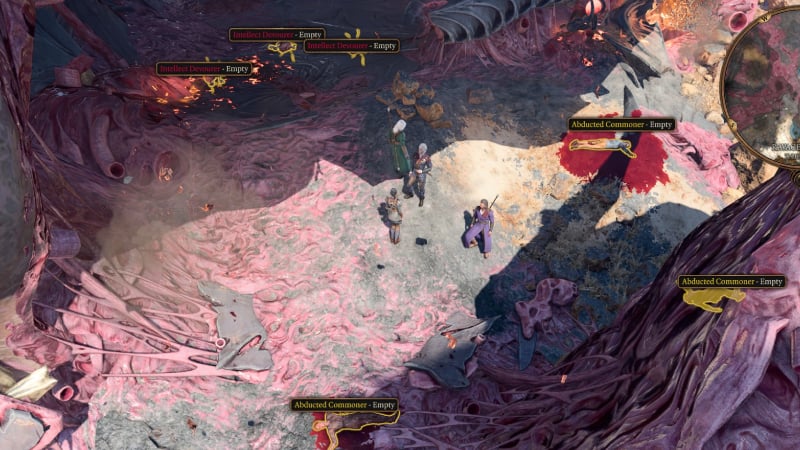
In Baldur’s Gate 3, it can be extremely difficult to see items and corpses lying on the ground due to the game’s colors and camera angle. It should become your reflex to hold down the “Left ALT” key wherever you go so you don’t miss out on things you can interact with or loot. By pressing “Left Alt” you can highlight corpses, and objects lying on the ground around you. Keep in mind this feature highlights some boxes but not some chests and barrels. So before you leave the area you’re in, it’s a good idea to hover your mouse over the things you can interact with.

How to Activate Highlight Objects Option in Baldur’s Gate 3

If somehow objects not highlight in Baldur’s Gate 3 when you use the “Left Alt” key, you can activate the setting or change the key by following these steps.

  1. First, select “Options” from the main menu.
  2. Then go to the “Keybinds” menu.
  3. Scroll down the page a little, and you will see the Show Item Labels option. This setting should be assigned to the “Left Alt” key by default, you can change it to any key you like.

Related:

Should You Use Illithid Powers in Baldur’s Gate 3 (BG3)? Answered

Baldur’s Gate 3 is now available on PC.

Related Topics
Baldur's Gate 3 Guide
Share. Facebook Twitter LinkedIn Reddit Email
Akın Bilgin
  • Website
  • X (Twitter)

Akın Bilgin loves colony simulators, survival, and souls-like games. He has been a freelance guide writer for two years and is studying English Language and Literature in Turkey.

SUGGESTED READS

MindsEye Layoffs 2026
Gaming

Studio Behind GTA-like Game, MindsEye, Hit With More Layoffs, and Nobody is Surprised: ‘Shocked There’s Even a Janitor Working There’

Princess Peach Spin-Off Movie May Already Be in Development, Job Listing Suggests
Gaming

Princess Peach Spin-Off Movie May Already Be in Development, Job Listing Suggests

Xbox's New CEO Wants to Reconnect With the 'Community,' Yet Brings In More CoreAI Leaders
Gaming

Xbox’s New CEO Wants to Reconnect With the ‘Community,’ Yet Brings In More CoreAI Leaders

Diablo 4 Season 13 Tier List
Gaming

Class Tier List for Diablo 4 Season 13 (Best Classes for Endgame & Leveling)

Take-Two Boss Finally Explains Why GTA 6 Is Skipping PC at Launch: 'We'll See How It Works Out'
Gaming

Take-Two Boss Finally Explains Why GTA 6 Is Skipping PC at Launch: ‘We’ll See How It Works Out’

Rockstar Employee Review Claims 'Unrealistic' Crunch as GTA 6 Development Intensifies: 'Had to Work Till 3AM'
Gaming

Rockstar Employee Review Claims ‘Unrealistic’ Crunch as GTA 6 Development Intensifies: ‘Had to Work Till 3AM’

The Nerd Stash
Facebook X (Twitter) Instagram YouTube LinkedIn
  • About Us
  • Join Our Team
  • Meet the Team
  • Privacy Policy
  • DMCA Policy
  • Contact Us
  • Terms of Use
  • Sitemap
  • Editorial Guidelines
  • Advertising Policy
© 2026 The Nerd Stash. All Rights Reserved.

Type above and press Enter to search. Press Esc to cancel.