

Close Menu
  • Gaming
    • Platforms
      • Nintendo
      • PC
      • PlayStation
      • Xbox
  • Entertainment
    • Movies
    • TV
    • Royals
  • Celebrity
    • Hollywood
  • Human Interest
  • Astrology
  • More
    • Anime
    • Reviews
Facebook X (Twitter) Instagram LinkedIn YouTube
  • About Us
  • Join Our Team
  • Meet the Team
  • Privacy Policy
  • DMCA Policy
  • Contact Us
  • Terms of Use
  • Sitemap
  • Editorial Guidelines
  • Advertising Policy
The Nerd Stash
  • Gaming
  • Celebrity
  • Hollywood
  • Human Interest
The Nerd Stash
Home»Gaming»How to Save in Dragon’s Dogma 2

How to Save in Dragon’s Dogma 2

Ready for the next time you load in?

Nat CollazoBy Nat CollazoMarch 22, 20243 Mins Read
How to Save in Dragon's Dogma 2
Image Source: Capcom via The Nerd Stash
This article is over 2 years old and may contain outdated information.

The opening of Dragon’s Dogma 2 tells you that the game will autosave as you travel in the overworld. However, do you really want to rely on that when fighting goblins or escaping from harpies? It would be a nightmare if I closed the game out only to realize that none of my progress was saved. Fortunately, there’s more than one way to ensure that everything you do in-game is recorded before backing out.

Where Can You Save in Dragon’s Dogma 2?
How to Save in Dragon's Dogma 2
Image Source: Capcom via The Nerd Stash

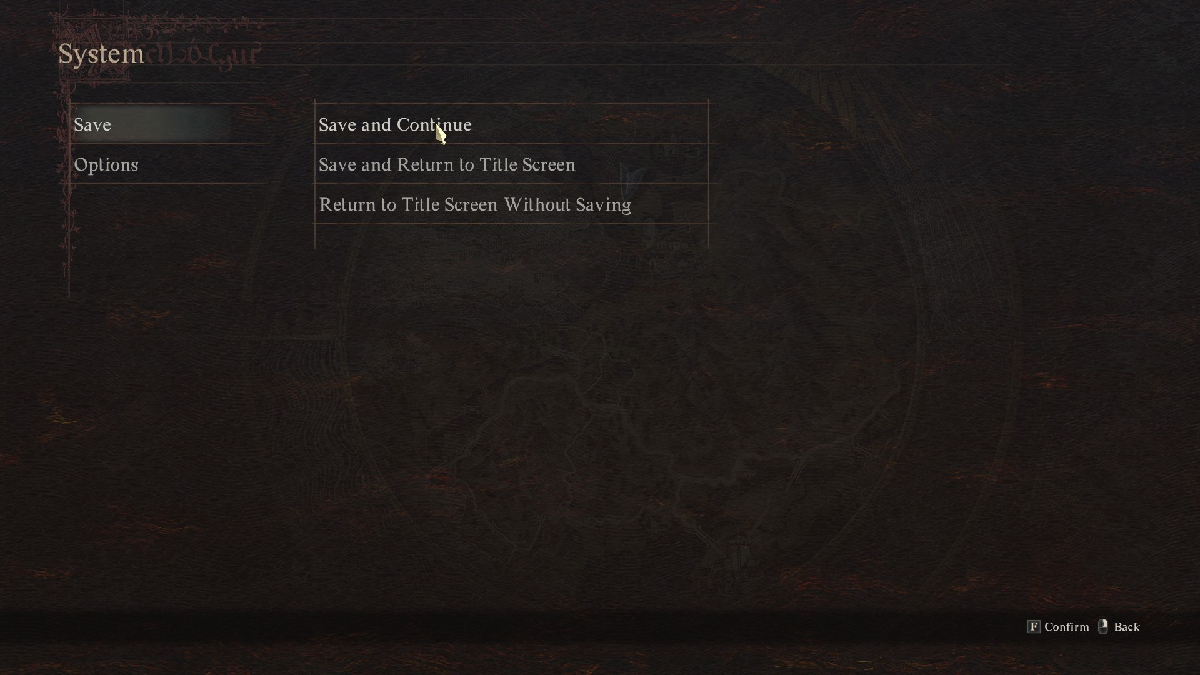
There are three ways for you to save your game in Dragon’s Dogma 2.

  1. Open the Pause menu and select the System option. Here, you can choose to Save and Continue or Save and Return to Title Screen.
  2. Autosaving will happen as you travel the overworld, fight monsters, and complete quests.
  3. Saving at an Inn will create a different save block in the game specifically for Inn saves. When you save your game regularly or autosave, those saves are simply known as your Last Save. When you go to reload a save, you have the choice to load your last save via the autosave or manual save or loading from the last Inn save.

How To Load Your Save

You can load two different saves in Dragon’s Dogma 2.

  1. Load from Last Save
  2. Load from Last Inn Rest

The first option will continue from where you left off the last time you manually saved or saved via the autosave feature. When you load from your last Inn rest, then you will instead load your character from the last Inn that you slept at. Considering this, I recommend taking a nap at every Inn that you come across. It’ll make loading in from where you were last a lot easier. Unfortunately, you need to be ready to fork over some dough before you can hope to stay at an Inn.

How to Delete Save Data

Dragon’s Dogma 2 only has one save file and it’s constantly being rewritten throughout the game. To delete your saved data, check out my guide on how to do just that. It’s a lot easier than the game makes it out to be.

Save File Location on PC

For those unaware, your save file location for Dragon’s Dogma 2 on PC is:

C:\Program Files (x86)\Steam\userdata\

Related:

Dragon’s Dogma 2 Starter Guide

Dragon’s Dogma 2 is available to play on PC, PlayStation, and Xbox.

Related Topics
Dragon's Dogma 2 Guide
Share. Facebook Twitter LinkedIn Reddit Email
Nat Collazo
  • Website
  • X (Twitter)
  • Instagram

I am a game journalist and guide writer with ten years of experience as well as the CEO/ Founder of Frowns Marketing, a marketing company that caters to indie games, tabletop games, and board games to help developers get more wishlists, backers, and players!

SUGGESTED READS

Your PlayStation Account Could Be Compromised: Sony's Security Flaw Lets Anyone Easily Disable 2FA
Gaming

Your PlayStation Account Could Be Compromised: Sony’s Security Flaw Lets Anyone Easily Disable 2FA

Rune Dice PC Review
9
Features

Rune Dice Review – A Magnificent Take on Roguelikes

PlayStation Plus Prices Are Going Up as Sony Tightens First-Party Exclusives
Gaming

PlayStation Plus Prices Are Going Up as Sony Tightens First-Party Exclusives Once More

Marvel Cosmic Invasion DLC Review
Features

Marvel Cosmic Invasion: Cyclops & The Thing Hands-On Impressions – Between a Rock and an Optic Blast

GTA 6's $115 Price Tag Already Has Fans Worried, Now Rockstar Might Skip Review Codes Too
Gaming

GTA 6’s $115 Price Tag Already Has Fans Worried, Now Rockstar Might Skip Review Codes Too

AMD's 'AI-Based' Game Engine Patent Sounds Like DLSS5 on Steroids
Gaming

AMD’s ‘AI-Based’ Game Engine Patent Sounds Like DLSS5 on Steroids

The Nerd Stash
Facebook X (Twitter) Instagram YouTube LinkedIn
  • About Us
  • Join Our Team
  • Meet the Team
  • Privacy Policy
  • DMCA Policy
  • Contact Us
  • Terms of Use
  • Sitemap
  • Editorial Guidelines
  • Advertising Policy
© 2026 The Nerd Stash. All Rights Reserved.

Type above and press Enter to search. Press Esc to cancel.




