Close Menu
  • Gaming
    • Game Guides
    • Codes
    • Game News
    • Game Previews
    • Game Reviews
    • Game Features
    • Game Lists
    • Platforms
      • Nintendo
      • PC
      • PlayStation
      • Xbox
      • Mobile
  • Entertainment
    • Movies
    • Movie Features
    • Movie Reviews
    • TV
    • Reality TV
    • Royals
  • Celebrity
    • Hollywood
  • Human Interest
  • Astrology
  • Videos
  • More
    • Anime
    • Lists
    • Podcasts
    • Reviews
Facebook X (Twitter) Instagram LinkedIn YouTube
  • About Us
  • Join Our Team
  • Meet the Team
  • Privacy Policy
  • DMCA Policy
  • Contact Us
  • Terms of Use
  • Sitemap
  • Editorial Guidelines
  • Advertising Policy
The Nerd Stash
  • Gaming
  • Celebrity
    • Hollywood
  • Human Interest
  • Videos
The Nerd Stash
Home»Game Guides»Starfield Ship Builder Habs Explained

Starfield Ship Builder Habs Explained

Ship Habs, short for habitats, are interchangeable areas of your ship in Starfield where your crew can live and coexist. Different Habs are important for different…

Nat CollazoBy Nat CollazoSeptember 11, 20233 Mins Read
Starfield Ship Builder Habs Explained
Image Source: Bethesda via The Nerd Stash
This article is over 2 years old and may contain outdated information.

Ship Habs, short for habitats, are interchangeable areas of your ship in Starfield where your crew can live and coexist. Different Habs are important for different things, from medical areas to crew quarters, making your ideal ship truly customizable. The ship builder in the game is a little confusing, so we thought it would be best to construct a guide that has all of the Starfield ship builder Habs explained.

Starfield Ship Builder Habs – Different Hab Types
Starfield Ship Builder Habs Explained
Image Source: Bethesda via The Nerd Stash

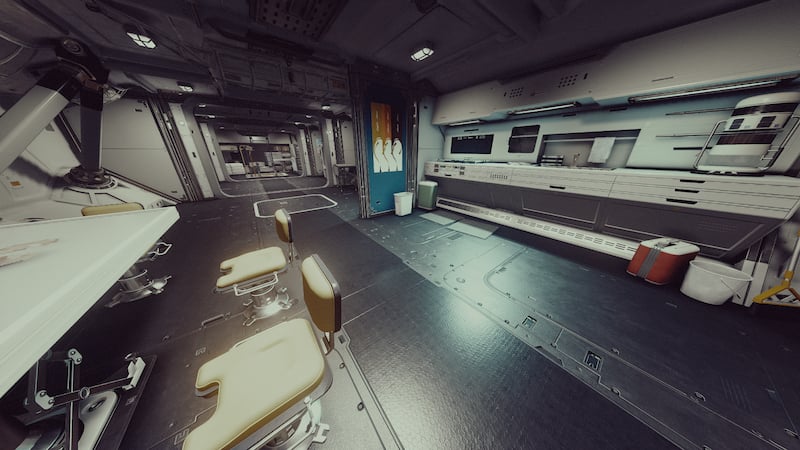
When you enter the ship builder and head over to the Habs category, you’ll find a list of Habs in different sizes and from different companies. What’s important are the different Hab types that are actually available from within this selection. We also included what you’ll be able to find within these Starfield shipbuilder Habs:

  • All-in-One Berth
    • Bed, Kitchen, (except for Nova Galactic B and Stroud A), Research Station, and Navigation Console (Nova Galactic A)
  • Armory
    • Weapon, pack, and helmet displays, mannequins, and chest storage.
  • Captain’s Quarters
    • Bed, storage chests, Nav console (Deimos, Stroud, and Taiyo), and Galley.
  • Computer Core
    • Storage chests.
  • Brig
    • Lockable cells with beds, and storage chests.
  • Battle Station
    • Navigation console.
  • Control Station
    • Crew stations.
  • Infirmary
    • Research lab, and Pharmaceutical lab.
  • Living Quarters
    • Beds, and kitchen.
  • Mess Hall
    • Kitchen (except Deimos 2×3).
  • Science Lab
    • Pharmaceutical lab, Research lab, and kitchen.
  • Workshop
    • Weapon, spacesuit, and industrial workbenches, and Research lab.
  • Engineering Bay
    • Crew stations.
  • Companionway
    • Nothing.
  • Storeroom
    • Nothing.

Starfield Hab Features

The features above can be important to your layout depending on what sort of player you’re trying to make or ship you’re trying to build. Considering that, we have also outlined what each of the features that the Habs can have are:

  • Passenger Slot
    • Allows more people to travel on your shop.
  • Crew Station
    • Gives your crew jobs and places to sit down and work.
  • Bed
    • Gives you and your crew places to rest.
  • Navigation Console
    • Opens your map from within your ship.
  • Weapon, Pack, and Helmet Display
    • Allows you to display your weapons, packs, and helmets.
  • Mannequin
    • Allows you to display your suits.
  • Storage Chest
    • Allows you to store items.
  • Industrial Workbench
    • A place for you to craft Components to be used in crafting.
  • Weapon Workbench
    • Allows you to upgrade your weapons.
  • Spacesuit Workbench
    • Allows you to upgrade your spacesuit.
  • Pharmaceutical Lab
    • Allows you to create aid items.
  • Research Lab
    • Allows you to undertake research projects.
  • Galley
    • Allows you to craft food items.

Starfield Hab Manufacturers

There are a total of five manufacturers across Starfield that undertake Habs. These are Deimos, Hopetech, Nova Galactic, Stroud Eklund, and Taiyo. The Nova Galactic Habs are completely unique from the other four whereas Hopetech and Taiyo are very similar, while Deimos and Stroud Eklund are also very similar.

Related:

How To Get the Narwhal Ship in Starfield

Starfield is available on Xbox Series X|S and PC.

Related Topics
Guide Starfield
Share. Facebook Twitter LinkedIn Reddit Email
Nat Collazo
  • Website
  • X (Twitter)
  • Instagram

I am a game journalist and guide writer with ten years of experience as well as the CEO/ Founder of Frowns Marketing, a marketing company that caters to indie games, tabletop games, and board games to help developers get more wishlists, backers, and players!

SUGGESTED READS

What Does 'LF' Mean in Adopt Me? Trading Terms Explained
Game Guides

What Does ‘LF’ Mean in Adopt Me on Roblox? Trading Terms Explained

Marvel Rivals Season 6.5 PC Preview
Features

Marvel Rivals Season 6.5 Hands-On Preview – The Hunt is On

Crimson Desert Life in Pywel Showcase
Game News

Crimson Deserts Wraps Up Its Spotlights By Showcasing the Cozy Side of Pywell

Monster Hunter Stories 3 PS5 Preview
Game Previews

Monster Hunter Stories 3 Preview – Creature-Collecting Done Right

Epstein pokemon go
Game News

Pokémon Go Finally Cuts Ties With Jeffrey Epstein, Removes PokéStop in Epstein Island: ‘Release the List of Everyone Who Checked in There’

High on Life 2 Review A Great High With a Bit of a Hangover
7.0
Game Reviews

High on Life 2 Review – A Great High With a Bit of a Hangover

The Nerd Stash
Facebook X (Twitter) Instagram YouTube LinkedIn
  • About Us
  • Join Our Team
  • Meet the Team
  • Privacy Policy
  • DMCA Policy
  • Contact Us
  • Terms of Use
  • Sitemap
  • Editorial Guidelines
  • Advertising Policy
© 2026 The Nerd Stash. All Rights Reserved.

Type above and press Enter to search. Press Esc to cancel.