


Close Menu
  • Gaming
    • Game Guides
    • Codes
    • Game News
    • Game Previews
    • Game Reviews
    • Game Features
    • Game Lists
    • Platforms
      • Nintendo
      • PC
      • PlayStation
      • Xbox
      • Mobile
  • Entertainment
    • Movies
    • Movie Features
    • Movie Reviews
    • TV
    • Reality TV
    • Royals
  • Celebrity
    • Hollywood
  • Human Interest
  • Astrology
  • More
    • Anime
    • Lists
    • Podcasts
    • Reviews
Facebook X (Twitter) Instagram LinkedIn YouTube
  • About Us
  • Join Our Team
  • Meet the Team
  • Privacy Policy
  • DMCA Policy
  • Contact Us
  • Terms of Use
  • Sitemap
  • Editorial Guidelines
  • Advertising Policy
The Nerd Stash
  • Gaming
  • Celebrity
  • Hollywood
  • Human Interest
The Nerd Stash
Home»Features»Saints Row: How to Change your Character’s Appearance

Saints Row: How to Change your Character’s Appearance

In Saints Row, most of your customization is done through the phone. Whether it be character customization or changing clothes, all you need to do…

Jordan MoyerBy Jordan MoyerAugust 23, 20223 Mins Read
Saints Row Character's Appearance
Credit: Saints Row - YouTube Trailer
This article is over 3 years old and may contain outdated information.

In Saints Row, most of your customization is done through the phone. Whether it be character customization or changing clothes, all you need to do is simply open up your phone. This article will explain how to change your character’s appearance in Saints Row. Granted, you won’t have all the options unlocked immediately, but you can surely get started and learn how to unlock more. Don’t worry. I’ll explain how to unlock more customization options as well. You’ll be ready to change your Boss’s look and clothes in no time!

How to Change your Character’s Appearance

On your in-game phone, there should be an app on the top row called the Style app. This is where you will do most of your customization. From here, you can alter your clothing, face, hair, and even body. Accessing the Style app will let you go into a full-character customization window. This will be similar to the beginning of the game, where you created your Boss’s initial look. Unlike games like GTA, where you have to travel to clothing shops to change your clothes, you can access a full wardrobe menu here. This will likely save you loads of time in-game. This makes changing your character’s appearance quite easy.
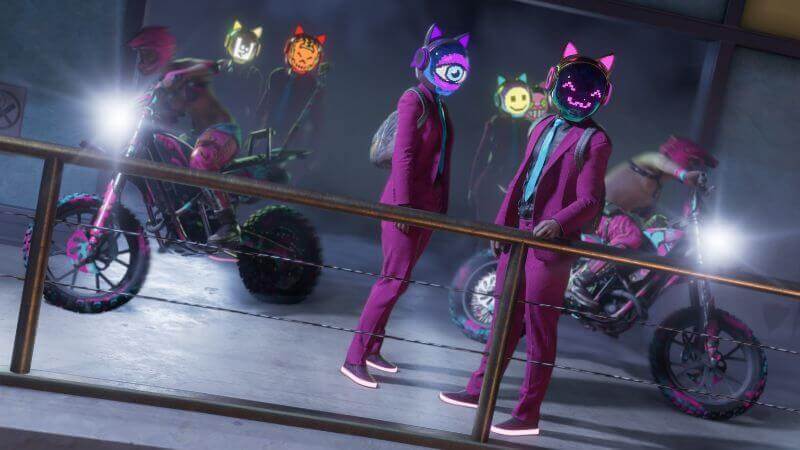
Saints Row Character's Appearance Customization
Crew Customization

The Style app on Saints Row can be insanely useful, as you can change nearly every element of your character’s appearance. This includes:

  • Face
  • Hair
  • Body
  • Clothes
  • Voice
  • Emotes
  • Censor options

The great thing about this is that no matter where you are in the lovely city of Santo Ileso, you can change your character’s appearance! There are no limits to when or where you can do this. Plus, changing your character’s look doesn’t affect your stats or abilities. It is purely cosmetic and fun.

Related:

How to Unlock Crew Customization in Saints Row

Getting New Clothes

When you first start out as the Boss in Saints Row, you don’t have many options in the way of clothing. There is only a small, basic selection. The majority of your clothing can be purchased from shops around Santo Ileso, but there is another viable option. You can gain clothing from doing missions, side quests, and Saints Row Ventures. Just keep in mind that the clothing offered varies from store to store in the game. The clothes offered are typically in line with the store’s aesthetic and differ from other stores’ stock clothes.


Related Topics
Guide SaintsRow
Share. Facebook Twitter LinkedIn Reddit Email
Jordan Moyer
  • Website
  • X (Twitter)

Jordan is an experienced fantasy writer who spends hours behind her laptop, and lost in the pages of a book. She strives to be a successful gaming blogger, and has no complaint about the hours of game time she used to increase her knowledge of all things “geek”. She primarily writes gaming articles and fantasy novels. Ark: Survival Evolved is a favorite, along with Diablo 3, Warframe and Minecraft lately, though you can’t forget the good old Magic the Gathering card game! Writing about games truly gives her joy as it gives her another perspective to look at games from, a reason to really look into the mechanics of the game.

SUGGESTED READS

TLOU Online Was '80% Done' And Was Cancelled Just 24 Hours Before Public Reveal: 'It Was Soul-Crushing'
Game News

TLOU Online Was ‘80% Done’ And Was Canceled Just 24 Hours Before Public Reveal: ‘It Was Soul-Crushing’

April Fools Gaming Jokes 2026
Game Features

The Best Gaming Jokes of April Fools’ Day 2026

How to Subscribe & Cancel Adopt Me Pet Plus Subscription
Game Guides

How to Subscribe & Cancel Adopt Me Pet Plus Subscription

Saros Outlets Previews
Game Features

Saros Previews Round-Up: Refining What Was Already Flawless

Crimson Desert Community Tips and Tricks
Game Guides

I Played Crimson Desert for 90 Hours and STILL Learned These 10 Tricks From Social Media

Doom Co-creator and Wife Say The Current Game Industry Is 'Crashier' Than the '80s Crash: 'It Can't Stay Like This Forever'
Game News

Doom Co-Creator and Wife Say the Current Game Industry Is ‘Crashier’ Than the ’80s Crash: ‘It Can’t Stay Like This Forever’

The Nerd Stash
Facebook X (Twitter) Instagram YouTube LinkedIn
  • About Us
  • Join Our Team
  • Meet the Team
  • Privacy Policy
  • DMCA Policy
  • Contact Us
  • Terms of Use
  • Sitemap
  • Editorial Guidelines
  • Advertising Policy
© 2026 The Nerd Stash. All Rights Reserved.

Type above and press Enter to search. Press Esc to cancel.



