Close Menu
  • Gaming
    • Game Guides
    • Codes
    • Game News
    • Game Previews
    • Game Reviews
    • Game Features
    • Game Lists
    • Platforms
      • Nintendo
      • PC
      • PlayStation
      • Xbox
      • Mobile
  • Entertainment
    • Movies
    • Movie Features
    • Movie Reviews
    • TV
    • Reality TV
    • Royals
  • Celebrity
    • Hollywood
  • Human Interest
  • Astrology
  • More
    • Anime
    • Lists
    • Podcasts
    • Reviews
Facebook X (Twitter) Instagram LinkedIn YouTube
  • About Us
  • Join Our Team
  • Meet the Team
  • Privacy Policy
  • DMCA Policy
  • Contact Us
  • Terms of Use
  • Sitemap
  • Editorial Guidelines
  • Advertising Policy
The Nerd Stash
  • Gaming
  • Celebrity
  • Hollywood
  • Human Interest
The Nerd Stash
Home»Game Guides»BitLife: How To Add Custom Cities and People

BitLife: How To Add Custom Cities and People

Customize your experience

Gabriela JessicaMadison BensonBy Gabriela Jessica and Madison BensonAugust 13, 20242 Mins Read
BitLife: How To Add Custom Cities and People
Image Source: Moana Games via The Nerd Stash
This article is over 1 years old and may contain outdated information.

Although BitLife seems like a simple game, there are numerous challenges that you can try to achieve in many of your playthroughs. Unfortunately, many of these trophies require you to have a character born in a certain region or befriend a specific person. Although you can wait for fate to let you get these factors organically, you can also take the easy path and add custom cities and people in BitLife.

How To Make Custom Cities and People in BitLife

[Updated on August 14, 2024 – Added new images and other details]
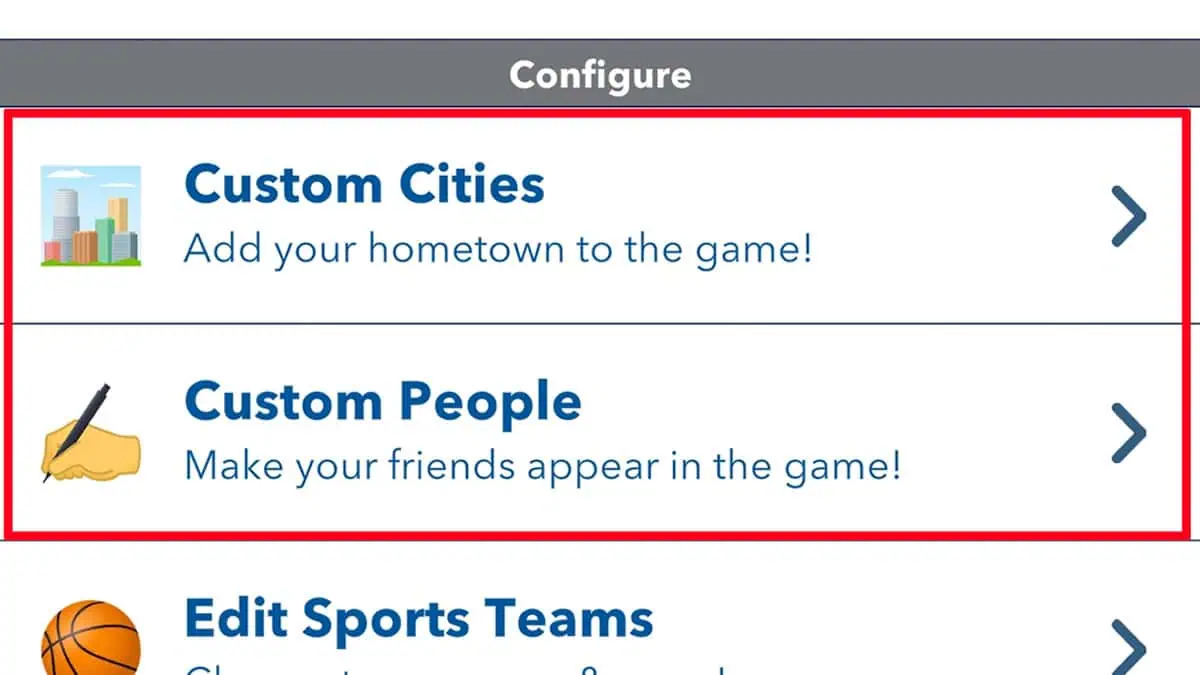
Creating custom cities and people in BitLife.
Image Source: Moana Games via The Nerd Stash

Unlike completing difficult challenges like Ultimate Cat Lady, adding custom cities and people in BitLife is very simple. Here are the steps you must follow:

  1. Launch BitLife on your device.
  2. Open the main menu via the icon on the top left corner.
  3. Scroll down until you reach the Configure section.
  4. There, you can find Custom Cities and People.

Custom Cities

If you want to add a specific location in BitLife, you can select Custom Cities and press the ‘Add Custom City’ button. Although you can add random and fictional places, like Hogwarts, you will need to be specific if you want to complete a specific challenge. Besides typing the city name, you also need to select the right country where the place should belong.

Generally, the game already lets you select your state and country whenever you start a new life, so this feature won’t be required. Besides using the Configure function, you can also add a new Custom City using another method:

  1. Open the main menu.
  2. Select New Life.
  3. Click Place.
  4. Scroll down to find Custom City.

Custom People

Adding a Custom People has more options than creating new cities in BitLife. Besides making a random new person, you can also add your real-life friends and families by importing your contacts. However, if you want to complete challenges, you will most likely need to create a fictional character from a popular series.

For example, to complete the Lex Luthor Challenge, you need to have an enemy named Clark Kent. You can use the hard way and just go out and socialize while hoping to meet someone with this name. Personally, I think it’s easier to add a new character called Clark Kent so you can get this trophy.


Related Topics
BitLife Guide
Share. Facebook Twitter LinkedIn Reddit Email
Gabriela Jessica, Madison Benson
  • Website

Gabriela has been a game guide writer since 2023. She mainly covers Genshin Impact and HSR but also enjoys trying out new games. Her favorites are TOTK, P5R, Stardew Valley, RDR2, The Witcher 3, and RE4 Remake.

Gabriela Jessica, Madison Benson
  • Website

Gabriela has been a game guide writer since 2023. She mainly covers Genshin Impact and HSR but also enjoys trying out new games. Her favorites are TOTK, P5R, Stardew Valley, RDR2, The Witcher 3, and RE4 Remake.

SUGGESTED READS

Pragmata PS5 Review
9.5
Game Features

Pragmata Review – Bold, Beautiful, and Unforgettable

Rockstar Games Hackers Threaten 'Large' GTA 6 Leak As 'Demands Had Not Been Met'
Game News

GTA 6 Hackers Threaten Leak of ‘Large Collection’ of Data As ‘Demands Had Not Been Met’

Fable Could Be Delayed to 2027 to Avoid GTA 6 Hype, Report
Game News

Fable Could Be Delayed to 2027 to Avoid GTA 6 Hype, Report

Saudi Game Publisher Says Japanese IP Is 'Like Oil,' Calls Middle East Partnership 'Very Important'
Game News

Saudi Game Publisher Says Japanese IP Is ‘Like Oil,’ Calls Middle East Partnership ‘Very Important’

Red Dead Redemption 2 FPS
Game News

YouTuber Goes Viral for Surviving Red Dead Redemption 2 at 2 FPS on Potato Laptop: ‘Nice Way to Wait for GTA 6’

Honkai: Star Rail 4.2 Update
Game News

Honkai: Star Rail Is Gearing Up For Its Third Anniversary Coming With Version 4.2

The Nerd Stash
Facebook X (Twitter) Instagram YouTube LinkedIn
  • About Us
  • Join Our Team
  • Meet the Team
  • Privacy Policy
  • DMCA Policy
  • Contact Us
  • Terms of Use
  • Sitemap
  • Editorial Guidelines
  • Advertising Policy
© 2026 The Nerd Stash. All Rights Reserved.

Type above and press Enter to search. Press Esc to cancel.