Close Menu
  • Gaming
    • Platforms
      • Nintendo
      • PC
      • PlayStation
      • Xbox
  • Entertainment
    • Movies
    • TV
    • Royals
  • Celebrity
    • Hollywood
  • Human Interest
  • Astrology
  • More
    • Anime
    • Reviews
Facebook X (Twitter) Instagram LinkedIn YouTube
  • About Us
  • Join Our Team
  • Meet the Team
  • Privacy Policy
  • DMCA Policy
  • Contact Us
  • Terms of Use
  • Sitemap
  • Editorial Guidelines
  • Advertising Policy
The Nerd Stash
  • Gaming
  • Celebrity
  • Hollywood
  • Human Interest
The Nerd Stash
Home»Features»How To Equip the Wolf Pup Backpack in Diablo 4

How To Equip the Wolf Pup Backpack in Diablo 4

In a game with a dark and scary atmosphere like Diablo 4, having something like the Wolf Pup Backpack is really cute. When you put…

Akın BilginBy Akın BilginJune 3, 20232 Mins Read
diablo 4 wolf pup backpack
Image source: Blizzard via The Nerd Stash
This article is over 2 years old and may contain outdated information.

In a game with a dark and scary atmosphere like Diablo 4, having something like the Wolf Pup Backpack is really cute. When you put this bag on your back, a puppy will be sleeping on your back. It is the only thing you need when killing monsters and fighting your demons. You will have the most adorable bag among your friends. Without further ado, here’s how to get and equip the Wolf Pup Backpack.

Equipping the Diablo 4 Wolf Pup Backpack Reward
wolf pup backpack not showing up in Diablo 4
Image source: Blizzard via The Nerd Stash

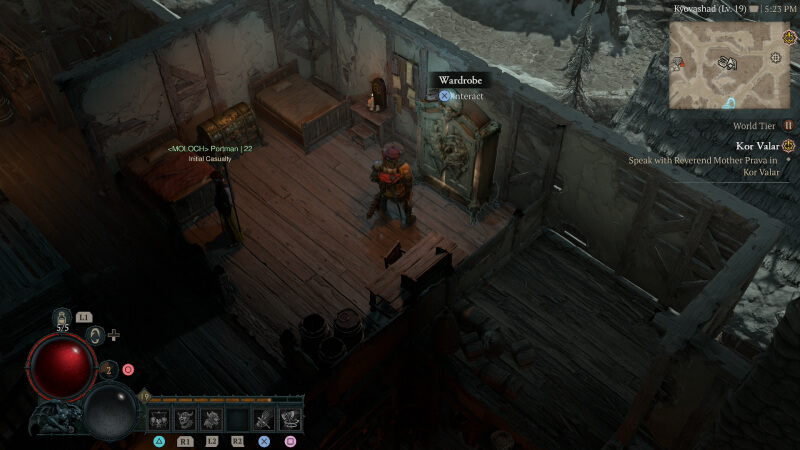
Being unable to equip the Wolf Pup has confused many Diablo 4 players. However, there is no need to worry; thanks to this short guide, you will learn how to equip it in no time. The first town you will visit will most likely be Kyovashad.

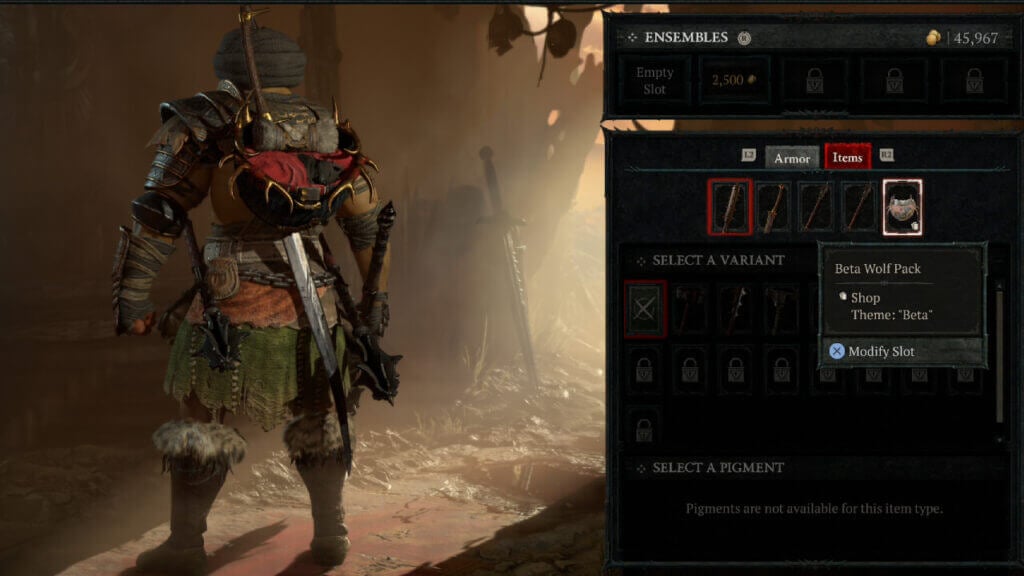
Open the map of this small Town and you will see the Wardrobe icon. Go to this Wardrobe located in the Inn. When you interact with it, a window will pop up allowing you to change equipment and equip cosmetic items. Click on Items and select Back Trophy on the far right to find your Beta Wolf Pup Pack.

How To Get Wolf Pack Backpack in Diablo 4

The Beta Wolf Pack was given exclusively to beta players by Diablo 4. During the Beta process, you had to be level 20 to get this backpack. Unfortunately, you can’t get the Wolf Pup Backpack if you haven’t played in Beta and haven’t leveled your account to 20.

Diablo 4 Wolf Pup Backpack Not Showing Up Fix

Many players claimed that they reached Level 20 in the Beta but never received the bag. You may be one of them, but there is no need to be afraid. Because Diablo announced on its official Twitter account that it will be available at the release in June.

Related:

Diablo 4 Deluxe Edition vs. Standard – All Editions Compared

Diablo 4 will be available on PlayStation 5, PlayStation 4, Xbox Series X/S, Xbox One, and Windows on June 6.

Related Topics
Diablo 4 Guide
Share. Facebook Twitter LinkedIn Reddit Email
Akın Bilgin
  • Website
  • X (Twitter)

Akın Bilgin loves colony simulators, survival, and souls-like games. He has been a freelance guide writer for two years and is studying English Language and Literature in Turkey.

SUGGESTED READS

Path of Exiles 2 Build Planner Guide
Gaming

How To Use the Build Planner in Path of Exile 2

Adopt Me Kicks Off Summer With Journey to Summer Camp Update, Here's All The New Week 1 Pets & Rewards
Gaming

Roblox Adopt Me Launches Journey to Summer Camp Update, Here’s All the Week 1 Pets & Rewards

LEGO Batman Legacy of the Dark Knight PC Review
9
Gaming

LEGO Batman: Legacy of the Dark Knight Review – A Hero Rises

Call of Duty: Modern Warfare 4 Launching This October on Next-Gen Consoles & Switch 2, But Not Game Pass
Gaming

Call of Duty: Modern Warfare 4 Launching This October on Next-Gen Consoles & Switch 2, But Not Game Pass

Hideo Kojima Teams Up With Prada for an AI Film, And Fans Aren't Happy: 'Beyond Incredibly Disappointing'
Gaming

Hideo Kojima Teams Up With Prada for an AI Film, And Fans Aren’t Happy: ‘Beyond Incredibly Disappointing’

The Witcher 3 Songs of the Past expansion
Gaming

A Witcher 3 Leak Just Forced CD Projekt Red to Announce a Brand-New Expansion: Songs of the Past

The Nerd Stash
Facebook X (Twitter) Instagram YouTube LinkedIn
  • About Us
  • Join Our Team
  • Meet the Team
  • Privacy Policy
  • DMCA Policy
  • Contact Us
  • Terms of Use
  • Sitemap
  • Editorial Guidelines
  • Advertising Policy
© 2026 The Nerd Stash. All Rights Reserved.

Type above and press Enter to search. Press Esc to cancel.